Why is it essential to use an easy-to-read font?
If you've ever landed on a web page that was nearly impossible to read, you already understand the importance of having readable web content. You only stick around for a short time on that page, right? You're not alone; most people won't. So if a site can't keep visitors around, how can it convert them? Simple. It can't because content that isn't readable isn't convert-able.
In contrast, sites that provide an enjoyable online reading experience see better traffic, engagement, and conversions. While many factors contribute to a positive online reading experience, well-readable font is ubiquitous. So that's where you should start.
We will discuss choosing the best typeface for your online content and publications, whether digital publications or online documents such as reports, newsletters, annual reports, or websites and blogs.
Replace this with image caption
Effects Of Typographic Choices
Ideally, your website copy and online content alone are enough to satisfy your readers and reach your content goals. Yet you can influence the perception of text through typography:
- Branding: Your website will replicate the style of your brand and either use the fonts defined by your brand or typefaces that bring out your brand's qualities. A clean and professional brand image asks for a typeface befitting that look.
- Psychology: A typeface's look and feel evokes a mood or emotion that should match your brand and your content to give it a personal voice.
- Legibility: Typography can improve the onscreen appearance of text and make it easy to read. An optimum speed and ease can encourage readers to go on.
- Scanning: Even those readers who only quickly scan your content can retain more information when the typographic choices on a website allow for easy scanning.
- Accessibility: Similarly, making your content accessible to users with impairments across devices is not only a design priority, but it also helps get your message in front of readers.
Why is typeface important?
Different fonts shows different brand emotions
For starters, fonts can create particular associations for readers that elicit distinct emotions about a whole brand identity or company. Think of the font used for Disney's logo versus Sony's: two different fonts and feels.
The same is true for all fonts. When you think of Times New Roman, you might think "stale" or "pedagogic." In contrast, words like "polished" and "sophisticated" may come to mind when considering Garamond. Both are serif fonts (distinguished by the small decorative lines added to the end of a stroke in a letter or character) but have different associations.
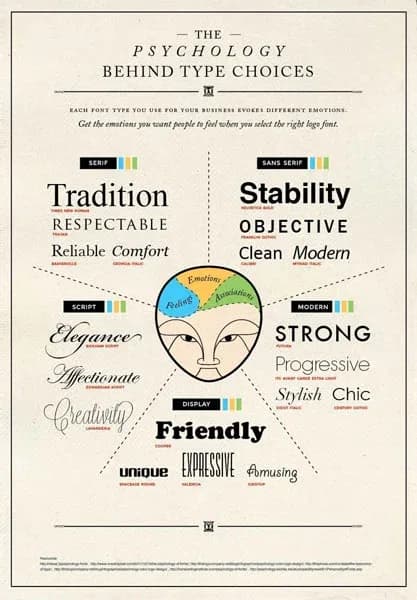
The typefaces on your website support reader comfort, legibility, engagement, and ultimately conversion and, therefore, business growth. The following infographic gives an overview of the feelings readers associate with various typefaces:
The Psychology Behind Type Choices - CrazyEgg
For his project Logofonts, designer Emanuele Abrate replaces popular fonts for the wordmarks of famous logos with the popular fonts in use. Google, therefore, becomes the popular font for Product Sans, the name of the default font that the search engine uses for its logo. You can browse the project for font inspiration.
In another font study, experimenter Errol Morris asked 45,000 New York Times readers to take a quiz. Contrary to the title, the quiz did not mean to test whether readers were optimists or pessimists but whether typefaces affected perceived truth.
Morris used six fonts for the study:
Typefaces for easy reading
- Baskerville,
- Computer Modern,
- Georgia,
- Helvetica,
- Comic Sans, and
- Trebuchet.
He found that Baskerville promoted the most confidence and engendered a belief that a sentence is true. (To read more on this study, click here.) The decision on typeface is important; content marketers should tread carefully.
Serif vs. sans-serif fonts for easy reading
When choosing a font, there are two main categories: serif and sans-serif fonts. Each has unique characteristics that make them suitable for different projects. Understanding the difference between these fonts will help you choose the right one for your project.
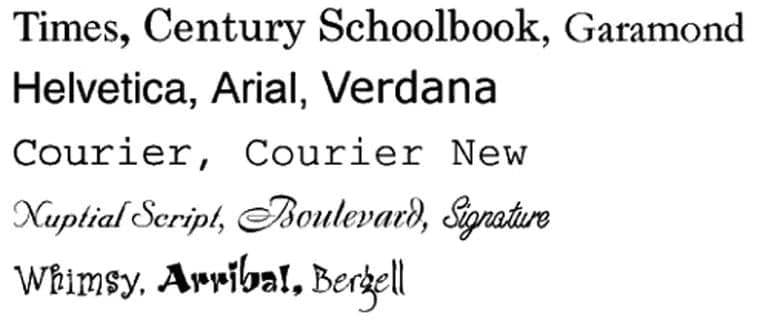
Small lines or strokes characterize serif fonts at the end of each character's letterform, called "serifs." These serifs give the text a classic look, more befitting in print publications like books and newspapers. Serif typefaces are also easier to read when printed on paper because their distinct letter shapes can help guide readers' eyes from one line of text to another. Examples of decorative fonts include Times New Roman, Garamond, and Georgia.
Sans-serif fonts don't have any extra strokes attached to characters; all letters have clean edges with no additional elements added on. Sans-serif typefaces tend to convey a more modern feel than serif ones, which explains why their frequent occurrence in digital applications such as websites and apps—but they can also appear casual or playful depending on the specific font chosen. Examples include Arial, Helvetica, and Open Sans.
Serif fonts are more traditionally used as print fonts and are typically used in media such as newspapers and magazines. Non-serif fonts are often used for digital media, such as websites.
In an IBM and Google eye-tracking study, the researchers also measured the legibility of many sans-serif fonts vs. sans-serif fonts. The study found that sans serif typeface fonts (they used Georgia) were read 7.9 percent faster than sans serif fonts (the study used Helvetica), although the difference was insignificant.
Many other studies found the same. And there is much, much more that goes into the readability of text (e.g., letter spacing, height, width, weight, shape, etc.).
What makes a font easy to read?
A combination of factors determines font readability, such as font size, typeface, weight, spacing, and line height. The best way to select the optimal combination for a particular graphic design is to experiment with different fonts and see which is the most readable font.
Font size
An essential factor in making a font easy to read is choosing a font size appropriate for the design. Generally speaking, larger fonts are easier to read than smaller fonts.
Font weight
Font weight refers to the thickness of the font strokes, which can affect its readability. For example, bold fonts can be easier to read than lighter-weight fonts, as they contrast and stand out more on the page.
Spacing
Spacing, or the space between letters, also influences font readability. If the spacing between letters is too wide, the text can look disconnected, while if it is too close, it can look cluttered.
Line height
Line height is the vertical space between lines of text and is essential for making long passages easy to read. If the line height is too small, the lines can be difficult to distinguish, while if it is too large, it can create a lot of extra space between lines.
Font height
Font height and width both influence font readability. Font height, or the distance between the font's base and the top of the tallest letter, affects the overall size of the font. Fonts with a tall height are easier to read than fonts with a short height.
Font width
Font width, or the distance between the edges of the letter, affects the readability of individual letters. Narrow fonts can be challenging to read, as the letters can appear too close together, while wider fonts can be easier to read, as the letters have more space between them.
Font family
Generally, fonts that work well on a website have open counters (the opening within letters such as O or D), generous apertures (the opening between counter and glyph outside, as in c or e), and feature a moderate contrast in the thickness of character strokes. Consider how well they reproduce natural strokes at small sizes when using serifs.
A note on accessibility
Fonts and their characteristics can significantly impact people with visual impairments. Font size affects how easily your audience can read the text. Fonts that are too small can be difficult for those with visual impairments to read, while too large can be overwhelming.
What Is the Easiest Font to Read? (10 Top Options)
So for the scope of this article, here's a simplified list of some of the easiest fonts to read and some pairings.
Encouraged & popular Google fonts
- Nunito Sans
- Raleway
- Lato
- Verdana
- Open Sans
- PT Sans
- Source Sans Pro
- Roboto
Adobe Fonts has a wide selection of readable fonts. Here are some that are exceptionally readable:
- Montserrat
- Proxima Nova
- Myriad
- Minion
- Caslon
- Futura PT
- Franklin Gothic
Note: for this page, we selected the very legible Google font Nunito Sans, a perfectly readable font for any digital document on a computer screen or mobile device.
Fonts to avoid:
- Comic Sans (#1 most hated)
- Courier
- Papyrus
- Impact
- Souvenir
- Times New Roman
- Brush Script
- Gill Sans
Arial, Times, and Helvetica are also among the most hated but are more acceptable due to their universal availability.
Combining serif typeface and sans serif font choices
Content creators can mix serif and sans-serif fonts to optimize readability and create an original look. With their traditional and classic look, serif fonts are suitable for long blocks of text as they are easier to read in large quantities. Sans-serif fonts are great for titles and subtitles as they are more modern and stand out.
Content creators can also experiment with different font weights and typefaces to customize the look and feel of their designs. By combining different fonts, content creators can create a unique look that is also highly readable.
Here are some great pairings to get the best of both worlds.
Google font pairings for high readability:
- Nunito Sans: PT Serif
- Avenir: PT Serif
- Raleway: Merriweather
- Lato: Noto Serif
- Verdana: PT Serif
- Open Sans: Source Serif Pro
- PT Sans: Arvo
- Source Sans Pro
- Roboto: PT Serif
Adobe font pairings for high readability:
- Montserrat: Garamond
- Proxima Nova: Garamond
- Minion: Arno
- Myriad Pro: Jenson
- Caslon: Jenson
- Futura PT: Sabon Next
- Franklin Gothic: Baskerville
Tips for selecting the easiest font to read for your content
Readability
We can't stress enough that your font design should be highly readable and straightforward. Never compromise on readability and legibility, especially with mobile devices and users in mind.
But also, pay attention to these factors:
Match your brand and message
Pick the easiest fonts to read, according to what your business site, brand, and website represent, and match the personality of the perfect font of your message. Which characteristics are important? Traditional, respectable, comfortable, reliable? Contemporary, modern, minimalistic, progressive? Strong, stable, defined? Elegant, luxurious, vintage?
Match your audience
Take your readers into consideration and identify the age range and social demographic of your target audience. Fulfill readers' expectations by presenting them with the easiest fonts to read, a font style that fits your sector, and only add a slight personal touch. If necessary, research your successful competition to understand their font use.
Versatility
If you find it challenging to pair two fonts, one is enough. Remember that you can use different font styles and weights right fonts to accentuate and distinguish headings and subheadings by size from body text. This difference in styling will work well with modern sans-serif fonts such as Open Sans or Roboto.
Readability
We can’t stress enough that your font design should not be too complex. Never compromise on readability and legibility, especially with mobile users in mind.
Mobile Considerations
For more information on your mobile devices, the typography section in Google's Material Design guidelines offers clear and consistent design hints. Here are a few considerations when choosing fonts for mobile web design:
- Consider toning down the desktop experience, which might mean using only a serif or sans serif font - or use a more decorative typeface sparsely for touches here and there.
- Limit yourself to just two typefaces on mobile to give readers and users a better visual experience on smaller screens.
- Check that characters are distinct and readers won't mistake similar glyphs for one another (uppercase "I," lowercase "l," number "1"), especially at smaller sizes.
- Typefaces should complement each other; they can contrast visually, but similar character width and line length are helpful for legibility.
- The more extravagant your font choices are on desktop, the more seriously you should consider substitutions on mobile.
There is a large body of user research about font readability, particularly regarding how font size, weight, and typeface affect the user readability of the most readable fonts used by web designers.
Conclusion
Never write off your font choice as something unimportant. Choosing the right font size and typeface can make a big difference in the readership and conversions you obtain.
Give users an unpleasant experience, and there are countless other places to turn. Don't do your competition any favors - be smart about your font choices.
Want to read more?
Here are some links to user research about font readability:
• UX Planet: Font Readability
• NN Group: Best font for Online Reading: No Single Answer
• Smashing Magazine: A Reference Guide For Typography in Mobile Web Design
• UX Matters: Typography in Web Design